Switching on, adjusting the light output, setting up DMX: everything about the SOLIS light source – condensed from the user manual.
Downloads
You will always find the latest version of the user manual here. The QR code in the printed manual leads to this page.
User manual
Good to know
Mains connection 110–240 V, 50/60 Hz
Power 75 W LED
Light output 5–100 %
Colour temperature 5,600 K, CRI > 95
Ambient temperature −15 °C to +40 °C
Ingress protection IP30
Weight 3.8 kg
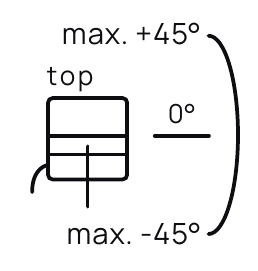
Tilt max. ±45°
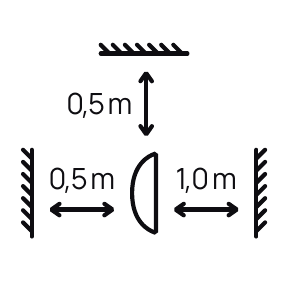
Distance to flammable materials min. 0.5 m upwards and to the rear, 1.0 m in the direction of the light
Getting started
The SOLIS light source is the basis of every extension. This is how you switch it on and, optionally, set up DMX.
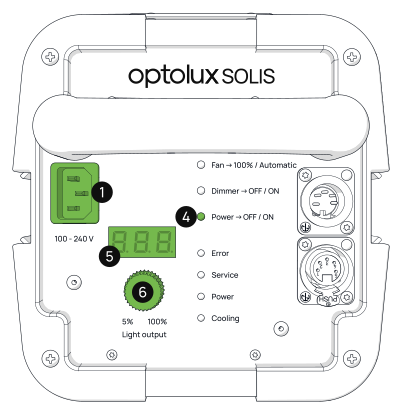
Standard setup
1 Plug in the power cable.
4 Switch on the SOLIS by pressing the power button.
6 Turn the control wheel to adjust the light output – from 5 % to 100 %.
5 The current setting is shown on the display.
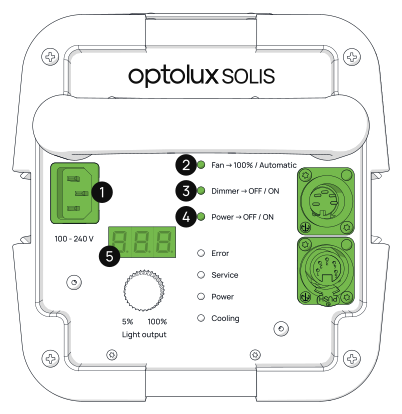
Additional DMX setup
1 Unplug all DMX cables, then plug in the power cable.
3 As soon as the display lights up, press and hold the dimmer button. The SOLIS is now in setup mode.
2 Press the fan button to switch the DMX channel up.
4 Press the power button to switch it down.
Safety and operation
Please read these notes carefully before using optolux SOLIS lights or accessories.
General safety notes
→ Read the safety notes carefully before using optolux SOLIS lights or accessories, and keep them in a safe place.
→ optolux SOLIS lights are designed for professional indoor use. Outdoors they must be protected from moisture.
Mounting and operation
→ Only use stable stands and properly fastened mounts.
→ Secure stands with weights or floor fixings and barriers.
→ Observe the max. 45° upward / downward tilt.
→ Mount on level ground and ensure a non-slip, stable set-up.
→ Operating temperature: SOLIS −15 °C to +40 °C, light guides −15 °C to +35 °C.
→ Avoid use when temperature fluctuations cause condensation.
→ Obtain approval before use in hospitals, museums or factories.
Safety measures
→ Use a double safety device for overhead mounting.
→ Keep a safety distance from flammable materials of 0.5 m upwards and to the rear and 1.0 m in the direction of the light.
→ Never block cooling slots or fans.
→ Avoid dust, moisture and potentially explosive environments.
→ Route cables safely – free of trip hazards, undamaged and protected.
→ Only replace damaged cables with original parts.
→ Never attempt to repair cables or fuses.
→ Check housings, cables, plugs and mounts for damage before each use.
Operation
→ Carry out a visual inspection before each use.
→ Never operate without a properly installed light guide.
→ Switch off defective lights immediately and contact an authorised dealer.
→ Only use original optolux parts.
→ Never leave lights unattended while in operation.
→ Disconnect the device from the mains when not in use.
→ Not for general room lighting – for professional use in photography or film only.
Light guides, lenses, lamps and fuses
→ Never replace LEDs yourself – contact an authorised dealer.
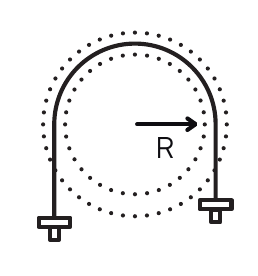
→ Observe the correct bending radii for light guides.
→ Let lights and cables cool down completely after use before packing them away.
Further notes
→ Do not look directly into the light source – risk of permanent eye damage.
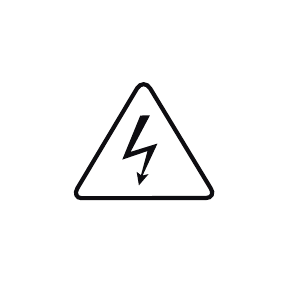
→ Improper use can lead to severe electric shocks or burns.
→ Keep all lamps and accessories out of the reach of children.
Explanation of symbols



Frequently asked questions
Do I need a SOLIS for FOCUS, TRIO or MONO?
Yes. FOCUS, TRIO, and MONO are extensions without their own light source and are connected to a SOLIS via a light guide. If you do not yet have a SOLIS, choose the optolux SOLIS FOCUS, TRIO, or MONO set – it includes the light source and the respective extension.
Where can I find the current user manual?
You can find it on your product's support page under "Downloads." The QR code included in the packaging will take you directly there.
Where can I buy optolux products?
From our authorised dealers: Profot AG in Switzerland and optolux solutions gmbh in Germany and worldwide.
How do I adjust the light output?
Turn the control wheel on the back of the SOLIS. The light output can be set from 5 % to 100 %; the display shows the current setting.
How do I set up the SOLIS for DMX?
Unplug all DMX cables, then plug in the power cable. Next, press and hold the dimmer button – when the display shows AXX, the SOLIS is in setup mode. Use the fan button to increase the DMX channel and the power button to decrease it. Important: You must keep the dimmer button held down throughout this process.
In which temperature range may I operate the SOLIS?
The SOLIS itself from −15 °C to +40 °C, the light guides from −15 °C to +35 °C. Avoid use when temperature fluctuations cause condensation.
May I use the SOLIS outdoors?
The SOLIS is designed for professional indoor use. Outdoors it must be protected from moisture.
What distance must I keep from flammable materials?
At least 0.5 m upwards and to the rear, and 1.0 m in the direction of the light. Never block cooling slots or fans.
May I mount the light overhead?
Yes, but only with a double safety device. The light may be operated tilted by a maximum of 45° upwards or downwards.
Contact
If you have questions about your device, repairs or spare parts, we and our authorised dealers will be happy to help.
Profot AG
Pilatusstrasse 39, CH-5630 Muri AG
optolux solutions gmbh
Limburgstraße 27, DE-73066 Uhingen
optolux lichttechnik gmbh
Jutenbühl, CH-6086 Hasliberg Reuti